StateTree Integration
Documentation Unreal Engine AI StateTree
Graph-authored AI structure on top of the same combat pipeline as the native brain.
USECBrainComponentreadsUEnemyAIConfig::DefaultStateTree. A path runs a runtimeUBotStateTreeAIComponent; an empty path runs the native loop (build context, move, poll, execute) with no graph.
When to Use This
- Patrol, investigate, search, or boss phases you want to author in a StateTree.
- Different high-level states that share the same combat loop subtree.
- Awareness-driven branches without wiring perception delegates by hand.
Leave
Default State Tree empty when pure combat is enough. Scoring, movement, and execution stay the same in both modes.How It Works
On possession,
SECBrainComponent resolves the config through SECCombatControllerComponent::ResolveAIConfig:DefaultStateTreeset:SECBrainComponentspawnsUBotStateTreeAIComponent, takes the brain slot, and the component loads the asset on possession.DefaultStateTreeempty: tick the native loop onSECBrainComponent(EvaluationCooldowndefault 0.1s).- StateTree fails to start: log a warning and fall back to the native loop.
Call
RefreshBrain() after you change the config at runtime without re-possessing.Both paths call the same components:
USECDecisionLibrary, MovementEvaluatorComponent, ActionEvaluationComponent. StateTree tasks are thin wrappers around those APIs.Setup
Assign
Default State Tree on UEnemyAIConfig. Copy Reference on the asset in the Content Browser and paste the soft path.Details
Enemy AI Config (EnemyAIConfig)
Behavior
Default State Tree
Content/SoulslikeEnemyCombat/.../StateTree_SEC_Core
Decision Context Params
Aggression Level
1
Window Id Interval Seconds
1.0
LOS Trace Channel
Visibility
LOS Trace Complex
Empty Default State Tree runs the native combat loop. Decision Context Params feed Build Decision Context and the native brain.
Shipped showcase path (plugin content):
Content/SoulslikeEnemyCombat/Showcase/AI/StateTree/StateTree_SEC_Core. StateTree_RoleBehavior is the combat-loop subtree shown in the screenshots below.Requirements on the controller:
SECCombatControllerComponent, ActionEvaluationComponent, MovementEvaluatorComponent, and SECBrainComponent. AEnemyControllerBase creates all four. Custom controllers need the same set.Shipped Graph Layout
StateTree_SEC_Core picks Idle vs Combat. Combat runs a role subtree when the AI has a focus target and a non-None combat role.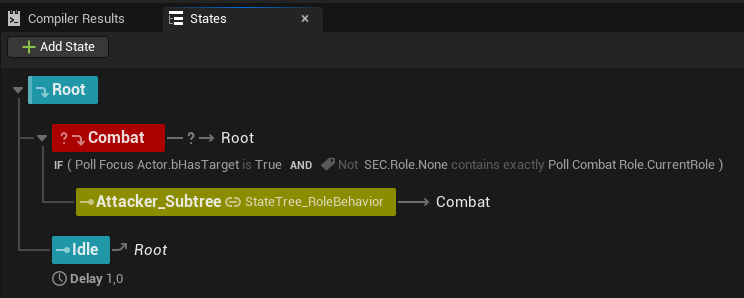
StateTree_RoleBehavior is the combat loop subtree: poll focus and role, build context, poll action, branch to AI Movement or Do Action, then a short Recovery delay before polling again.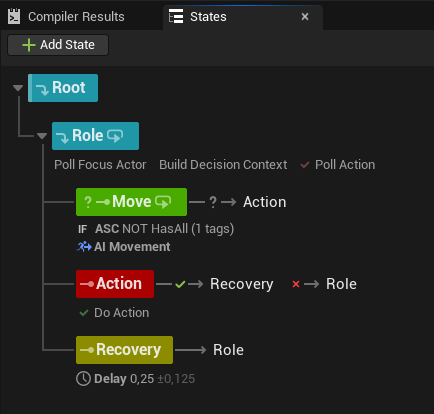
The graph Recovery state is a timed pause in the tree. Action Recovery Time on
EnemyAIConfig only suspends offensive action selection while movement and reactions continue. Use Recovery for a brief settle; use ActionRecoveryTime to tune attack spacing.Combat Loop Wiring
Bind these three tasks for the core fight loop:
Build Decision Context → Poll Action → Do Action
         ↓
AI Movement (parallel tick while in Move state)| Editor name | C++ struct | Role |
|---|---|---|
| Build Decision Context | FSTTask_BuildDecisionContext | Fills OutDecisionContext each tick via USECDecisionLibrary |
| Poll Action | FSTTask_PollAction | Scores on EvaluationCooldown; skips while an action runs |
| Do Action | FSTTask_DoAction | Calls ExecuteAction; finishes on OnActionExecutionCompleted |
| AI Movement | FSTTask_AIMovement | Calls MovementEvaluatorComponent::EvaluateAndMove |
Poll Action outputs
OutChosenAction and bHasValidAction. Wire InChosenAction on Do Action from that output.Do Action does not poll
SEC.Action.End. It binds ActionEvaluationComponent::OnActionExecutionCompleted and finishes the StateTree task when execution ends.Task Reference
Combat tasks use
USECDecisionLibrary and eval/movement components. Role polling uses SECCombatControllerComponent::ResolveCurrentCombatRole. Focus and awareness tasks read the controller directly (GetFocusActor, USECAwarenessComponent).Combat and decision
| Editor name | Use |
|---|---|
| Build Decision Context | Every tick in active combat states |
| Poll Action | Pick the next action from the active ActionSet |
| Do Action | Run the chosen action |
| AI Movement | Tactical positioning while in a Move state |
Polling helpers
| Editor name | Use |
|---|---|
| Poll Combat Role | Exposes CurrentRole and OnRoleChanged |
| Poll Focus Actor | Exposes FocusActor and bHasTarget from GetFocusActor() |
Role sync (optional)
| Editor name | Use |
|---|---|
| Sync Action Set | Poll pawn SECActionSetComponent into ActionEvaluationComponent |
| Sync Reaction Set | Poll pawn SECReactionSetComponent into ReactionEvaluationComponent |
| Sync Movement Profile | Poll EnemyAIConfig movement profile into MovementEvaluatorComponent |
SECCombatControllerComponent calls SyncStateForCombatRole when combat roles change (action set, reaction set, movement profile). You only need the Sync tasks for custom controllers or when the graph must own sync timing.Manual override
| Editor name | Use |
|---|---|
| UpdateActionSet | Sets a fixed ActionSet on ActionEvaluationComponent (boss phase swap, debug) |
Conditions
| Editor name | C++ struct | Use |
|---|---|---|
| ASC Has Tag | FSTCondition_ASCHasTag | Gate on pawn ASC tags (HasAny / HasAll) |
| Awareness State At Least | FSTCondition_AwarenessState | Branch on USECAwarenessComponent state |
ASC Has Tag binds
Pawn, not the controller. The pawn must implement IAbilitySystemInterface.Awareness State At Least compares
GetAwarenessState(Target) to MinState. Empty Target uses the most-aware target. Ordering: Unknown < Forgotten < Suspicious < Lost < Detected.Integration
| System | StateTree touchpoint |
|---|---|
| Action System | Poll Action / Do Action; FDecisionContext::bHasLOS gates LOS actions |
| Movement System | AI Movement; profiles sync on role change or Sync Movement Profile |
| Awareness System | Awareness State At Least; Poll Last Known Location |
| Combat Roles | Poll Combat Role; Core tree checks role before Combat |
| Multiplayer Support | Same server-side pipeline; graph runs on authority |
AdvancedBuild Decision Context fields
Resolved once on EnterState from
UEnemyAIConfig::DecisionContextParams via ResolveDecisionParams.Each tick fills
FDecisionContext:- Spatial: distance, angle,
bHasLOS(eyes-to-eyes trace onLineOfSightTraceChannel). - Self:
HealthPercentagefromBasicHealthComponentif present, else 1.0;Staminafixed at 100;Speedfrom pawn velocity;AggressionLevelfrom params. - Target:
ThreatLevelfrom focus distance and facing (notThreatDetectionComponent). - Tags: ASC tags on self and target;
WorldTagsfromUSECWorldTagSubsystemon the server.
GAS-backed health belongs in an Attribute Scorer on the action, not in the context struct.
AdvancedBlueprint decision readers
| Node | Returns |
|---|---|
| Get Decision Context (AI Controller) | FDecisionContext |
| Get Decision Context (Pawn) | Same; resolves the pawn's controller first |
| Resolve Decision Params | FSECDecisionContextParams from config |
All three are server-only. Off authority they return defaults.
A getter uses a fresh window and seed (
DeltaTime = 0), so WindowId / Seed will not match the running brain cadence. Read spatial, health, threat, and tag fields live; do not expect identical score jitter.AdvancedAwareness tasks
Poll Last Known Location
Reads
USECAwarenessComponent::GetLastKnownLocation. Outputs LastKnownLocation, AgeSeconds, bValid, ResolvedTarget. Bind LastKnownLocation to AI Move To for search/investigate states.Empty
Target uses GetMostAwareTarget.Typical loop: patrol below Suspicious; investigate at Suspicious; combat at Detected; search at Lost; drop to Idle on Forgotten. See Awareness System.
AdvancedBotStateTreeAIComponent
Runtime component created by
SECBrainComponent when a StateTree is configured.Details
Bot State Tree AI Component (BotStateTreeAIComponent)
AI|StateTree
Auto Initialize From Config
Fallback State Tree
None
SECBrainComponent creates this at runtime when Default State Tree is set. Custom controllers can add it manually.
Init order on possession: controller cached config → pawn
IEnemyAIConfigProvider → FallbackStateTree.AddLinkedStateTreeOverride swaps subtrees by gameplay tag for variants.