Melee Trace
Documentation Unreal Engine AI Melee Combat
Frame-rate independent swept weapon traces with per-window damage configs and ISECDamageable integration.
Each active frame,USECMeleeTraceComponentsweeps from the last socket positions to the current ones. Fast swings still register hits at 30 or 144 FPS.
Viewport
Interpolation OFF
LVL_SEC_Showcase>Melee Trace
Swing Speed60°
SIM_FPS: 10
STATUS: TUNNELING
0
Successful Hits
Without Interpolation: The fast sword swings 'teleport' over the target between frames, causing a miss.
When to Use This
- Melee on AI or player pawns.
- Swings that outrun per-frame overlap checks.
- Several hit zones on one weapon (blade, pommel).
- Different damage per montage window through
SECDamageConfig.
AEnemyCharacterBase ships with USECMeleeTraceComponent. Add SEC Melee Trace to any other pawn you want in the pipeline.How It Works
Register trace sockets on the wielder (usually when the weapon equips).
StartTracing captures socket positions and enables tick. Each tick sub-steps between previous and current transforms and sweeps sphere, capsule, or two-point capsule shapes (SubStepDistance, MaxSubSteps).| Shape | Use |
|---|---|
| Sphere | Fists, small contact points. |
| Capsule | Single-socket volume aligned to bone rotation. |
| CapsuleTwoPoint | Span between two mesh sockets (typical sword blade). |
The first tick after
StartTracing records positions only; sweeps begin once a previous sample exists.Hit order:
TeamFilterand duplicate checks (CanHitActor, owner ignored).OnMeleeHitwithFMeleeHitData(contact VFX/SFX hook).ISECDamageable:BuildDamageInfo→ApplyDamage→HandleDamageResult→OnMeleeHitResponse.- No interface:
RecordHit,ApplyPointDamage(CurrentDamage,DamageTypeClass),OnMeleeHitResponsewithbDamageApplied = true.
StartTracing and tick body return early without authority. StopTracing clears active sockets, hit records, and disables tick.Setup
1. Component on the wielder
Details
SEC Melee Trace Component (SECMeleeTraceComponent)
Damage
Default Damage Config
None
Base Damage
10
Hit Reset Interval
0
Team Filter
No Filter
Trace
Sub Step Distance
10
Max Sub Steps
20
Debug
Draw Debug
Debug Draw Duration
0.1
Default component on the enemy pawn. Add SEC Melee Trace to other wielders manually.
Set
Default Damage Config or Base Damage when a notify omits damage.2. Weapon mesh sockets
Add sockets on the weapon mesh (example:
blade_start, blade_end).3. Weapon Blueprint
Subclass
ASECWeaponBase, fill TraceSockets. OnEquipped assigns SourceComponent to the weapon mesh and calls RegisterTraceSocket_Struct on the wielder's trace component.Details
Weapon Trace Socket (FSECTraceSocket)
SEC|Weapon
Attach Socket
hand_r
SEC|Trace
ID
Blade
Shape
Capsule Two Point
Socket Or Bone Name
blade_start
End Socket Or Bone Name
blade_end
Radius
15
Trace Channel
Pawn
One TraceSockets array entry on the weapon Blueprint. OnEquipped registers sockets on the wielder trace component.
Per-attack damage comes from the montage notify or component default, not the weapon actor.
4. Damage config
Create
SECDamageConfig, assign on the notify or Default Damage Config:Details
SEC Damage Config (SECDamageConfig)
Damage
Damage
10
Damage Type
None
Forces
Hit Bone Force
0
Hit Overall Force
0
Hit Rotational Force
0
Data asset assigned on the montage notify or the trace component Default Damage Config.
Per window: notify
Damage Config → Default Damage Config → Base Damage. StartTracingSimple accepts a numeric override; values below zero fall back to Base Damage.5. Montage window
Add Notify State → SEC Melee Trace Window on strike frames:
Details
SEC Melee Trace Window (SECMeleeTraceNotifyState)
Melee Trace
Socket IDs
1 Array element
Damage Config
DA_SwordDamage
Debug
Enable Debug Draw
Anim notify state on strike frames. Empty Socket IDs activates every registered socket.
Empty
Socket IDs activates every registered socket. Names must match each trace socket ID.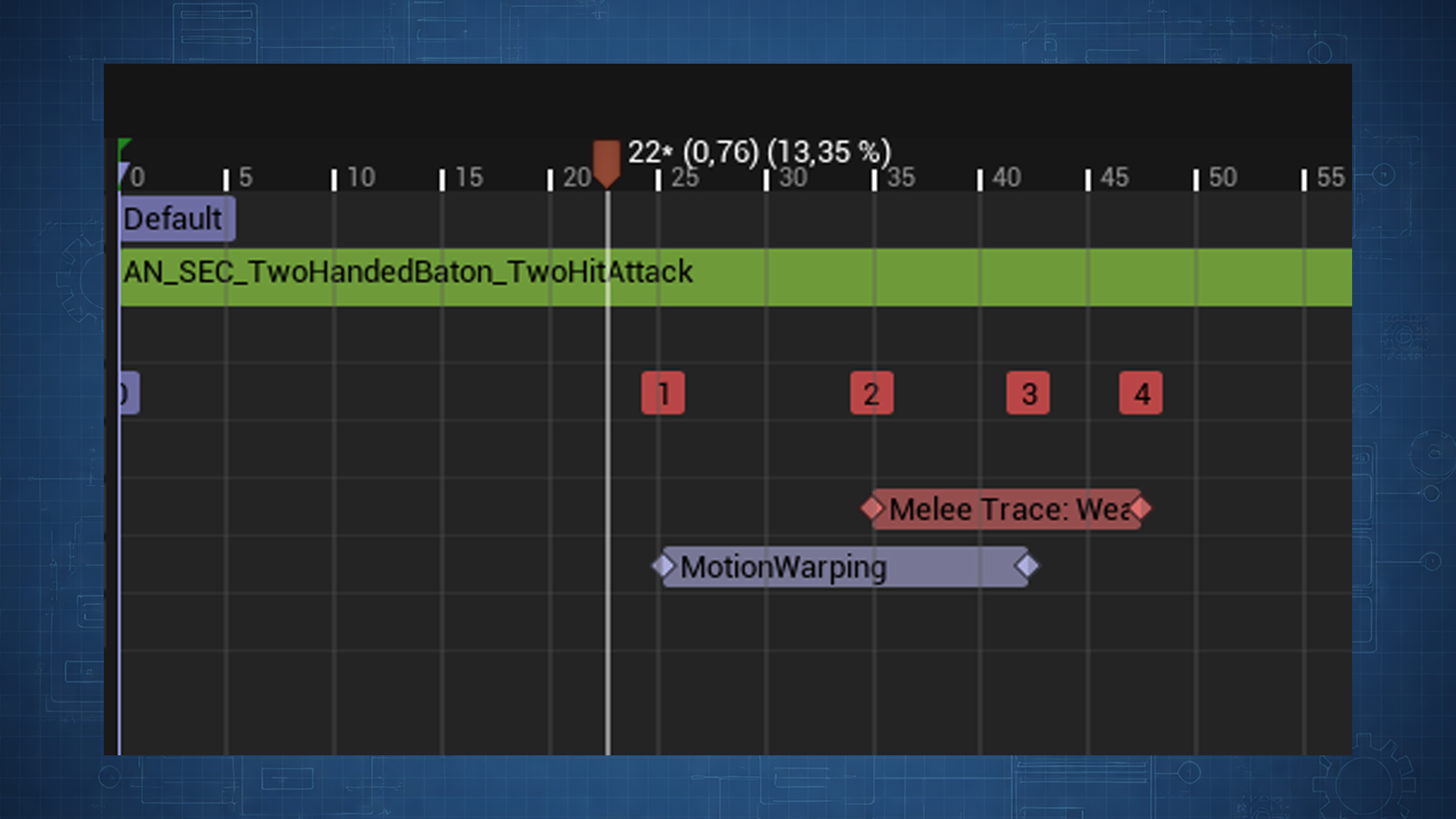
Equip, play the montage: register on equip,
StartTracing at notify begin, StopTracing at notify end.Integration
| System | Link |
|---|---|
| Reaction System | ApplyDamage returns ResultTags for reaction selection. |
| Multiplayer | Trace and damage on authority; clients follow replicated state. |
| Configuration Reference | Shared project tuning (reconcile damage fields with this page). |
TeamFilter on the trace component (damage gating, not combat target selection):Details
SEC Melee Trace Component (SECMeleeTraceComponent)
Damage
Team Filter
No Filter
Damage category on the wielder trace component. Filters who can be hit, separate from combat target selection.
AdvancedDelegates and manual control
void StartTracing(const TArray<FName>& SocketIDs, USECDamageConfig* DamageConfig = nullptr, bool bDebugOverride = false);
void StartTracingSimple(const TArray<FName>& SocketIDs, float DamageOverride);
void StopTracing();

void RegisterTraceSocket_Struct(const FSECTraceSocket& TraceSocket);
void UnregisterTraceSocket(FName ID);
void UnregisterAllSockets(); // weapon swap: stock OnUnequipped does not call thisOnMeleeHit: FMeleeHitData (HitResult, FromSocketID, DamageConfig).OnMeleeHitResponse: FMeleeHitData + FSECDamageResult.Subclass
BuildDamageInfo or HandleDamageResult for crit scaling, pierce, or custom hit recording.Blueprint helpers:
RegisterSphereSocket, RegisterCapsuleSocket, RegisterTwoPointCapsule.AdvancedISECDamageable pipeline
FSECDamageInfo: Instigator, HitResult, HitDirection, DamageDefinition (ToDamageDefinition() when a config is active).FSECDamageResult: bDamageApplied, ResultTags.HandleDamageResult recording:| Result | Recording |
|---|---|
bDamageApplied = true | RecordHit (blocks repeat hits this window when HitResetInterval is 0). |
bDamageApplied = false, tags match SkipRecordTags | No record (dodge: try again next frame). |
bDamageApplied = false, other tags | RecordHit (parry/block consumes the swing). |
bDamageApplied = false, empty tags | No record (ignored stimulus). |
HitResetInterval: 0 allows one recorded hit per target per window. Above 0, the same target can register again after that many seconds; expired records purge each tick.AdvancedDebug
SEC.Debug.Melee.DrawTracing 1
Component
Draw Debug, or notify Enable Debug Draw for one window (bSessionDebugOverride).AdvancedCommon issues
| Problem | Likely cause | Fix |
|---|---|---|
| No hits | SocketIDs ≠ socket ID | Match FName strings. |
| No hits | Sockets missing | Equip via ASECWeaponBase::OnEquipped; wielder needs trace component. |
| Miss first active frame | Warm-up tick | Normal: sweep needs a prior position sample. |
| Through walls | TraceChannel | Pick a channel blocked by world geometry. |
| Two hits one swing | Two sockets touch | Expected; narrow active SocketIDs or shapes. |
| No damage on SEC pawn | No interface | Implement ISECDamageable. |
| Client swing, no damage | No authority | StartTracing / tick skip non-authority owners. |