Action System
Documentation Unreal Engine AI Actions
Action selection that scores available moves and picks the highest for the current context.
Scores every action against live battlefield data: context tags, plus distance, angle, and health when you add scorers for those dimensions.
Action Evaluation Flow
Content>Plugins>SoulslikeEnemyCombat>Components
ActionEvaluationComponent
EvaluateBestAction()
Gameplay Ability
(Simple Action)
Behavior Tree Sequence
(Complex Logic)
The system dynamically chooses the execution method. Behavior Trees can be chained for complex sequences.
When to Use This
- Any AI that needs to choose between multiple attacks or behaviors
- Enemies with distance-dependent movesets (melee vs ranged)
- Boss fights with phase-based action sets
- Group AI where different roles use different attack patterns
This system runs on its own. You can use it without the other plugin systems.
How Scoring Works
On every evaluation, all valid actions compete. The highest score above zero wins.
Final Score
ActionEvaluationComponent>Scoring
Final Score
Selection Weight
Risk Penalty
Tag Multipliers
Novelty
Penalizes recent useChain Bonus
Scorers
Distance · Angle · Health · Speed · customRuntime Modifiers
GlobalMultiplier × SetActionOverrideJitter
±5%, deterministicHighest score above zero wins. Leave a scorer off and that dimension drops out of the product. Jitter is deterministic from the decision context seed.
Runtime modifiers scale every action's score:
SetGlobalMultiplier buffs or nerfs the whole moveset (0 blocks all selection), and SetActionOverride(ActionId, Multiplier) targets one action. They multiply together in the formula.A small jitter factor (deterministic ±5% from the decision context seed) breaks ties so two enemies with the same data do not pick identically every tick.
Two base numbers sit on every action:
- Selection Weight biases the action up or down. Weight
2.0doubles its score against a weight1.0action. - Risk Penalty divides the final score to hold risky moves back.
1.0is no penalty,2.0halves the score (a high-risk heavy attack),0.5doubles it (a safe move).
Scorers (distance, angle, health, speed, and custom ones) fold in as multipliers. Leave them off and that dimension does not affect the score. An action with no Distance Scorer scores the same at any range. A scorer that returns 0 zeroes the whole product for that action.
Distance, Angle, Health & Speed Scorers
Add a Distance Scorer to score against AI-to-target distance. Leave it off and the action is distance-agnostic. The same pattern covers angle, health, and speed: one scorer per dimension, each with a
Range curve (FRangeEval) for its optimal zone. An attack can be valid from 0-500cm while its score peaks at 150-250cm.Each scorer exposes a single
Range property. Below Min Value the score is 0; it ramps up to 1.0 across Optimal Min, holds at 1.0 through the Optimal Min → Optimal Max sweet spot, then ramps back down to 0 at Max Value. Exponent shapes the falloff. Distance Scorer Range at the melee-preset default:Range
Min Value
0
Optimal Min
100
Optimal Max
250
Max Value
500
Exponent
2
Clamp To Zero
The four built-ins and their
Range defaults:| Scorer | Reads | Range default |
|---|---|---|
| Distance Scorer | AI-to-target distance in cm (0 with no target) | MakeMeleeRange() |
| Angle Scorer | Angle to target in degrees, 0 facing it, 180 away (0 with no target) | MakeFrontalAngle() |
| Health Scorer | AI health, 0-1 fraction | MakeAlwaysOne() |
| Speed Scorer | AI horizontal speed in cm/s | MakeAlwaysOne() |
FRangeEval presets to assign to a scorer's Range:MakeMeleeRange()- Close-range distance band (0-100-250-500)MakeRangedRange()- Long-range distance band (300-500-1000-1800)MakeFrontalAngle()- Forward-facing cone (0-0-30-90, Angle Scorer)MakeLowHealthRange()- Peaks at low health (0-0-0.25-0.5, Health Scorer, for desperate moves)MakeAlwaysOne()- Always returns 1.0 (no preference)
A Health Scorer or Speed Scorer left at its
MakeAlwaysOne() default has no effect. Shape the Health Scorer's Range to favor low or high health. Use the Speed Scorer for pace-dependent moves (a running attack that should score only while sprinting). For health or stamina backed by a GameplayAttribute, use an Attribute Scorer or Attribute Gate.Cooldowns & Variance
An action's Cooldown group controls reuse.
Cooldown Duration is the base delay. Initial Cooldown blocks the move at spawn so enemies cannot open with a heavy hit. Randomization (%) adds ±variance (0.2 = ±20%). Spawn Cooldown Chance rolls a starting cooldown so a pack does not attack in lockstep. Max Consecutive Uses (-1 = unlimited, 2 = must switch after two uses) stops spam. Defaults:Cooldown
Cooldown Duration
5
Initial Cooldown
0
Randomization (%)
0.2
Spawn Cooldown Chance
0
Max Consecutive Uses
-1
An action commits its cooldown only after
BeginExecute succeeds and PreExecute hooks do not veto. If activation fails or a hook sets bVetoExecution, no cooldown is stamped and the action can retry next tick. A CanActivateAbility refusal during ability activation follows the same rule: off cooldown, free to retry.Recovery Time
Recovery time suspends offensive action selection for a set number of seconds after an enemy commits a move. The enemy still strafes, repositions, and reacts (parry, dodge, counter). It does not start a new attack. Use it when a relentless attacker needs gaps between swings.
Cooldown gates re-use of one move. Recovery gates all offensive actions after one ends. Tune the global windows on
UEnemyAIConfig under Recovery. Every field defaults to 0, so recovery stays off until you set a value.| Field | Sets |
|---|---|
ActionRecoveryTime | Seconds suspended after an action completes or times out. |
InterruptRecoveryTime | Seconds suspended after an action is interrupted or cancelled. Keep it shorter than ActionRecoveryTime so a parry or stagger does not double-stun. |
ActionRecoveryTimeRandomization | Plus or minus jitter on the completion recovery, so a pack does not act in lockstep. |
Per-action override. On the action's Recovery group, enable
bOverrideRecoveryTime and set RecoveryTime. The value replaces the global for that action; it does not add to it. With config ActionRecoveryTime = 3, a jab that sets RecoveryTime = 1 recovers in one second while other moves recover in three.To watch the gate at runtime, set
SEC.Debug.LogActionDecisions 1. While an enemy is held off, the decision log prints Recovering (X.Xs remaining). For a HUD, BlueprintPure IsActionRecovering(float& OutRemaining) returns whether the enemy is recovering and the seconds left.AdvancedRecovery window by exit path, and combo follow-ups
By exit path:
- Completed uses the action's effective recovery (the override if set, otherwise the global
ActionRecoveryTime). - Interrupted or cancelled uses
InterruptRecoveryTime. - Timed out uses the global
ActionRecoveryTime, never the per-action override. - Failed stamps no recovery window.
Combos flow through recovery. An action's preferred follow-up (
PreferredNextActionId) can still be selected while the enemy recovers, for ChainFollowupWindowSeconds after the action ends. Set that window on the evaluation component (default 0.6). 0 makes the follow-up wait out recovery like any other action. Only the named follow-up bypasses the gate. A non-completion end (interrupt or cancel) clears it, so a parried enemy cannot combo through its own recovery.Stacked or conditional recovery. For recovery that depends on state (extra recovery at low health), call
RequestRecoveryTime from a Lifecycle Hook PostExecute. The contribution folds into the window.Novelty & Chains
- Novelty: Recently used actions take a score penalty, so the AI mixes moves without hard randomization.
- Chains: Set
PreferredNextActionIdon an action. After a Light Attack, Heavy Finisher receives aChainBonusMultiplierboost (default1.5).
Organic Combos
Raise Smash's score after Hit. If the player rolls out of range, the AI drops the combo. It does not swing at air.
Preconditions (Hard Gates)
Before scoring, every action runs hard gates. Fail one and the action drops out for that tick.
| Gate | Blocks the action when |
|---|---|
Enabled (bEnabled) | The action is toggled off in the ActionSet. |
SEC.Action.BlockActions | The tag sits on the AI's ability system component (add it via a reaction's AddTags to freeze offense). |
| Valid execution method | The action has no configured method, or HasValidData returns false. |
| Cooldown / repeat limit | The action is still cooling down, or Max Consecutive Uses is exhausted. |
| Recovery | The AI is in a post-action recovery window (chain follow-ups excepted). |
RequiresTags | The combined Self/Target/World tags don't hold all of them. |
BlockTags | Any of them sits on Self, Target, or World. |
| Require Line Of Sight | The box is ticked and the AI has no clear view of its target. |
| Gates | Any USECGate in the action's CustomScoring → Gates array returns false. See Scorers & Gates. |
Stamina only blocks when you add a Stamina Gate (
MinStamina) to the Scoring list, or an Attribute Gate for a GAS stamina pool. Decision-context Stamina defaults to 100, so an action with no Stamina Gate ignores stamina.Require Line Of Sight reads
FDecisionContext::bHasLOS. The Build Decision Context task traces from the AI's eyes to the target each tick. Tick the box for ranged shots and gap-closers. Leave it off for moves that land blind (radial slam, taunt).While an action runs it applies its
AddTags to the AI's ability system component. SEC.State.IsMovementBlocked ships in that list by default and holds the enemy still mid-swing. Remove it from AddTags to let the AI move during that action.Execution Methods
Each action runs through an Execution Method: an instanced object under Execution that owns how the action runs. Two built-ins ship. You can write your own.
| Method | Runs |
|---|---|
| Gameplay Ability | A single Gameplay Ability, activated by tag or event. |
| Behavior Tree Sequence | One or more Behavior Trees, one after another. |
Pick a method once per action. Its fields appear inline under it: ability actions show ability fields, behavior-tree actions show the tree list.
Gameplay Ability
Activates a Gameplay Ability and listens for its end tag. Set these on the method:
| Field | Sets |
|---|---|
AbilityClass | The ability to activate. Auto-granted to the character's ASC. |
ActivationMode | ByTag or ByEvent (see Activation Modes). |
AbilityTag | Activation tag in ByTag mode, event tag in ByEvent mode. Auto-filled from the ability's class defaults. |
AbilityEndTag | Tag the system waits for to end the action. Auto-filled from the ability. |
AbilityTimeout | Seconds to wait for the end tag before giving up. 0 waits indefinitely. |
Your ability class must inherit from
UGameplayAbilityBase. It handles the end-event handshake that tells the Action System when the ability finishes. Without it, the AI gets stuck waiting.UGameplayAbilityBase provides rotation lock (bLockAIRotation: the AI commits to the attack direction with no mid-swing tracking), motion warping toward the target, and the action context (target, distance, direction, magnitude, tags) on activation.Motion Warping
Steer an attack toward its target.
UGameplayAbilityBase registers a warp target from the resolved action context. The montage's Motion Warp notify performs the warp.AdvancedMotion warping setup and tuning
UGameplayAbilityBase steers an attack toward its target with Unreal's Motion Warping. On activation the ability registers a warp target from the resolved action context: the event payload's target for event-driven activations, or AIController::GetFocusActor() when tag or direct activations carry no payload target. The plugin registers the target. The montage's Motion Warp anim notify performs the warp.The pawn must carry a
UMotionWarpingComponent. AEnemyCharacterBase does not add one, so warping no-ops on pawns without it.| Property | Default | Effect |
|---|---|---|
MotionWarpingTargetName | Target | Warp target key. Must match the Warp Target Name on the montage's Motion Warp notify. Set to None to disable warp setup for the ability. |
MotionWarpingOffset | 100.0 | Warp point offset in cm, placed in front of the target toward the AI. Doubles as a switch-off distance: once the AI is closer than this, root-motion warping pauses so the attack does not overshoot. The pause condition is created only while the offset is above 0. |
MaxWarpDistance | 0.0 | Skip gate. If the AI is closer than this when the ability activates, no warp target is set up. The default of 0 leaves the gate off (any distance warps). |
bLockAIRotation | true | Stops the controller from yawing the pawn toward focus during the ability. Warping runs on a separate path and still rotates the pawn during the notify window. |
Setup:
- Add a
UMotionWarpingComponentto your character, in the Blueprint through Add Component or in a C++ subclass throughCreateDefaultSubobject. - Place a Motion Warp notify window over the attack's windup in the montage.
- Set the ability's
MotionWarpingTargetNameto the notify's Warp Target Name.
Where the AI tracks versus commits depends on the notify window: rotation warps toward the target across the window, then the swing commits past it.
bLockAIRotation and warping run on separate paths, so a committed attack can still track during the warp window while controller facing stays locked.AM_SEC_TwoHanded_TripleAttack_Montage in the showcase content has a working Motion Warp setup. Copy its notify and warp values as a starting point.Activation Modes
Most abilities activate by tag (the default). Switch to event activation when the ability needs its payload on the first frame.
AdvancedByTag vs ByEvent activation
The ability method's
ActivationMode chooses how the ability is triggered:| Mode | How It Works |
|---|---|
| ByTag (default) | Calls TryActivateAbilitiesByTag using AbilityTag. The ability must have matching AbilityTags in its class defaults. |
| ByEvent | Sends a Gameplay Event using AbilityTag as the event tag. The ability must have a matching Trigger entry (Gameplay Event) in its class defaults, or use WaitGameplayEvent. |
ByEvent mode sends a payload with the instigator and current target actor. Your ability can read them on the first frame.
// Standard tag-based activation (default)
ActivationMode = EAbilityActivationMode::ByTag;
AbilityTag = "SEC.Action.Attack.Light";

// Event-based activation
ActivationMode = EAbilityActivationMode::ByEvent;
AbilityTag = "SEC.Action.Attack.SweepEvent";  // Used as the event tag
ByEvent abilities do not need AbilityTags in their class defaults. Instead, add a Trigger entry with the matching tag and set its source to Gameplay Event. The
AbilityTag field serves double duty: tag activation in ByTag mode, event tag in ByEvent mode.Behavior Tree Sequence
Runs one or more Behavior Trees in order. Use it for multi-stage behaviors: circling, investigating, boss sequences. Set these on the method:
| Field | Sets |
|---|---|
BehaviorTreeSequence | The trees to run, in order. |
BehaviorTreeTimeout | Per-tree timeout in seconds. 0 waits for each tree to finish. |
AbilityToGrant | Optional ability granted to the ASC so a BT task in the sequence can trigger it by tag. Setting it auto-fills the tags below. |
AbilityTag, AbilityEndTag, ActivationMode | Passed to the blackboard for a BT task that activates the tagged ability. |
AdvancedBlackboard keys and the ability-activation BT tasks
Before the first tree starts, the method writes these blackboard keys:
| Blackboard Key | Type | Value |
|---|---|---|
SEC_ActionId | Name | The action's ActionId |
SEC_AbilityTag | Name | The AbilityTag, written as the tag's full name |
SEC_AbilityEndTag | Name | The AbilityEndTag, written as the tag's full name |
SEC_ActivationMode | Name | "ByTag" or "ByEvent" |
SEC_TargetActor | Object | The current target (focus) actor |
SEC_SelfActor | Object | The AI pawn |
SEC_Distance | Float | Distance to target |
These keys must exist in your Blackboard Data Asset, with the exact types above, for the writes to succeed. A missing key or a type mismatch (for example a String key where the plugin writes a Name) is silently ignored. Add all
SEC_ keys to your Blackboard asset.The plugin provides two Behavior Tree tasks for activating abilities inside a BT:
Activate Blackboard Ability reads the ability tag and activation mode from the blackboard keys above, then activates the ability the Behavior Tree Sequence granted. Its
ActivationMode property has three options:FromBlackboard(default) - readsSEC_ActivationMode, falling back to ByTag if the key is empty.ByTag- always uses tag-based activation.ByEvent- always uses event-based activation.
Activate Ability is a standalone task where you set the ability class directly. It has
ActivationMode (ByTag / ByEvent) and an EventTag field that appears only in ByEvent mode. Use it to activate a specific ability from a BT without going through the Action System.Custom Execution Methods
The two built-ins cover abilities and behavior trees. For a latent task, spawned projectile, timeline, or third-party system, write your own method.
USECExecutionMethod is Blueprintable (Blueprint or C++).AdvancedWriting a custom execution method
Subclass
USECExecutionMethod in Blueprint or C++. Your method carries its own payload fields and slots into the action's Execution Method picker next to the built-ins.The action holds your method as a definition and never mutates it. On execution the component duplicates the definition. The running instance can hold per-execution state (spawned actor, montage handle, elapsed counter) as ordinary properties.
Override the phases you need:
| Function | When it runs | What to do |
|---|---|---|
BeginExecute | The action starts | Start your work. Return false to fail the start; the action charges no cooldown and can retry. |
TickExecute | Each frame while running | Poll or advance. Runs only when bWantsTick is set. |
AbortExecute | The action is interrupted or cancelled | Tear down: cancel timers, destroy spawned actors, unbind callbacks, restore state. |
Call
FinishExecution(bSuccess, Reason) when your work ends. The component completes the action on the next tick, so completion never re-enters your BeginExecute. The ability method calls it from the ability's end-tag event; the behavior-tree method calls it when the last tree finishes.The component owns everything around the method: cooldowns, recovery, lifecycle hooks, the timeout, and the started and completed delegates. Your method owns only the mechanism.
Four definition-side queries shape how the component treats the method. Keep them as pure reads:
| Query | Returns |
|---|---|
HasValidData | Whether the method is configured. An action whose method returns false is skipped, the same as an action with no execution data. |
GetAbilityToGrant | An ability class to auto-grant to the character's ASC, or none for a method that grants nothing. |
GetExecutionTimeout | Seconds before the component force-ends the method. Return 0 to wait on FinishExecution alone. |
GetDisplayName | The label shown on the action's Execution Method slot and in the logs. |
Report completion by calling
FinishExecution. A method that never calls it and returns 0 from GetExecutionTimeout ends only when the 30-second hard safety fires.A method instance is stateful and private to one execution, unlike a Scorer or Gate, which stays stateless and shared across every AI using the asset. Hold per-execution state on the method; the component discards the instance when the action ends.
Choosing the Action Set
The plugin resolves which ActionSet an enemy uses through a priority chain. Combat role changes trigger
SECCombatControllerComponent to sync.The resolver walks this chain and returns the first match:
| Priority | Source | Use |
|---|---|---|
| 1 (highest) | Runtime Override | SetRuntimeOverride(ActionSet). For boss phase transitions. |
| 2 | Equipped Weapon | A weapon actor implementing ISECWeaponActionSetProvider. |
| 3 | Config Role | Role-specific ActionSet from EnemyAIConfig (Attacker vs Flanker). |
| 4 | Config Default | Fallback ActionSet from EnemyAIConfig. |
| 5 | Component Default | SECActionSetComponent → DefaultActionSet on the pawn. |
| 6 | None | No ActionSet found. The AI moves but never attacks. |
Weapon and override changes take effect immediately. No role change required.
SECReactionSetComponentuses the same resolution chain for reaction sets.
Weapon-Driven AI
Equipped Weapon outranks Config. Give a skeleton a Bow and it becomes a sniper. Disarm it and it falls back to its Config set as a brawler.
Weapon Action Set Provider
AdvancedMaking a weapon supply its own action set
Implement the
ISECWeaponActionSetProvider interface on your weapon actor (Blueprint or C++). Override GetWeaponActionSetForRole(RoleTag) to return the appropriate UActionSet*.// Tell the pawn about the weapon:
Pawn->ActionSetComponent->SetEquippedWeapon(WeaponActor);
// Clear to revert to Config-based resolution:
Pawn->ActionSetComponent->SetEquippedWeapon(nullptr);Dynamic Actions
AdvancedGranting and revoking actions at runtime
Grant and revoke individual actions without swapping the whole set. These are
BlueprintCallable (Blueprint or C++).Pawn->ActionSetComponent->GrantAction(ThrowGrenadeSpec);
Pawn->ActionSetComponent->RevokeAction("ThrowGrenade");Granted actions persist across role changes and action set swaps. They participate in evaluation alongside the base ActionSet: same scoring, same cooldowns.
For bulk operations:
Pawn->ActionSetComponent->GrantActionsFromSet(BonusActionSet);  // Add all from set
Pawn->ActionSetComponent->RevokeActionsFromSet(BonusActionSet); // Remove all from set
Pawn->ActionSetComponent->ClearGrantedActions();                // Remove all granted
Scorers & Gates
Every scoring dimension past Selection Weight, Risk Penalty, tags, novelty, and chains is a Scorer or Gate on the action. Distance, angle, health, and speed each have a built-in scorer. Tags stay built into the pipeline. For mana, ally count, terrain, or faction state, attach your own. Each
FActionSpec has a Scoring group with two arrays:Content Browser
Content>Plugins>SoulslikeEnemyCombat>ActionSets
Scoring list
Action Scorers
SelectionWeight
Always present · × base
Distance Scorer
Distance Scorer · × range
Stamina Gate
Stamina Gate · pass / fail
Ally-Count Scorer
Ally-Count Scorer · × your rule
No scorers or gates — action scores on weight alone.
score = Weight × Distance · (Stamina pass) × Yours
Add from library
Distance ScorerData Asset (Scorer)
Stamina GateData Asset (Gate)
Create customBlueprint (USECScorer)
Each scorer multiplies in; each gate can veto. Mix built-ins with custom subclasses.
| Type | Base Class | Returns | Effect |
|---|---|---|---|
| Scorer | USECScorer | A multiplier (1.0 = no effect) | Folds into the action score. Above 1 favors, below 1 disfavors. |
| Gate | USECGate | true / false | A false drops the action from selection, like a built-in precondition. |
Add an entry, pick a built-in class or your own Blueprint/C++ subclass, and set its parameters inline. Same authoring pattern as Role Evaluators and Positioning Rules.
An action with an empty Scoring list scores on
SelectionWeight alone. No scorer or gate can veto it. Built-in hard gates still apply (cooldown, block tags, ability activation). Adding a scorer opts the action into that dimension. Omitting it leaves the action indifferent to it.Built-in Classes
| Class | Kind | Property | Use |
|---|---|---|---|
| Distance Scorer | Scorer | Range (default MakeMeleeRange()) | Score by AI-to-target distance in cm (0 with no target). The Range OptimalMin/OptimalMax also feed the positioning query. |
| Angle Scorer | Scorer | Range (default MakeFrontalAngle()) | Score by angle to the target in degrees, 0 facing it, 180 away (0 with no target). |
| Health Scorer | Scorer | Range (default MakeAlwaysOne()) | Score by AI health, a 0-1 fraction from the decision context. For a GAS health attribute, use Attribute Scorer. |
| Speed Scorer | Scorer | Range (default MakeAlwaysOne()) | Score by AI horizontal speed in cm/s. |
| Stamina Gate | Gate | MinStamina (default 0) | Veto unless decision-context Stamina is at least MinStamina. Stamina is 100 by default; for a GAS stamina attribute, use Attribute Gate. |
| Attribute Scorer | Scorer | Attribute, NormalizeBy, ValueEval | Scale by a GameplayAttribute through an FRangeEval curve. Optional normalize-by attribute (e.g. Mana / MaxMana). |
| Attribute Gate | Gate | Attribute, MinValue, MaxValue | Allow only while an attribute sits between a min and a max. |
Health or stamina backed by a GameplayAttribute? The decision context does not read GAS attributes. Health Scorer and Stamina Gate read the decision-context snapshot (BasicHealthComponent health, default-100 stamina). Point an Attribute Scorer or Attribute Gate at your attribute.
Examples
Cast a spell only above a mana threshold. Add an Attribute Gate, set
Attribute = Mana, MinValue = 30. The spell drops out whenever mana is below 30.Favor a heavy attack as rage builds. Add an Attribute Scorer, set
Attribute = Rage, NormalizeBy = MaxRage, and shape the curve to peak near full. The attack scores higher as rage fills.The same Scorers and Gates work on reactions. On the reaction path the component builds a live spatial snapshot (distance, angle, speed, health) from the pawn and
TargetOverride instead of the action decision context. See Reaction System.Custom Scorers & Gates
For anything the built-ins miss, write your own.
USECScorer and USECGate are both Blueprintable (Blueprint or C++).AdvancedWriting a custom scorer or gate
Subclass
USECScorer or USECGate and override its one function (ScoreMultiplier or PassesGate). FSECScoringContext carries the controller, target, owning ASC, the seed that SeededRandom uses, and a decision-context snapshot (below).Keep scorer and gate subclasses stateless. One instance is shared across every AI using the asset, so mutable fields alias across enemies. For randomness, use the
SeededRandom helper.SeededRandom draws from the per-action seed in FSECScoringContext. On the reaction path that seed is 0, so SeededRandom returns a fixed value. Vary reaction randomness through a built-in factor or your own context read.The scoring context snapshot.
FSECScoringContext copies a decision-context snapshot once per evaluation. Built-in Distance/Angle/Health/Speed Scorers and the Stamina Gate read from it:| Field | Meaning |
|---|---|
Distance | Distance to the focus target in cm (0 with no target). |
AngleDegAbs | Absolute angle to the target in degrees, 0 facing it (0 with no target). |
Speed | AI horizontal movement speed in cm/s. |
HealthPercentage | AI health as a 0-1 fraction. |
Stamina | AI stamina (default scale 0-100). |
These fields fill from the action decision context on the action path. On the reaction path,
ReactionEvaluationComponent builds a separate live snapshot (distance, angle, speed, health from the pawn and TargetOverride; stamina stays at the default 100 unless you use an Attribute Gate). Pass TargetOverride when evaluating reactions so spatial scorers measure against the attacker.Labeling. Each scorer and gate reports a display name through overridable
GetDisplayName() (BlueprintNativeEvent). It defaults to the class display name and drives the decision log, the score breakdown, and the editor array row title on UE 5.7+. Override it for a custom or dynamic label (fold the configured range into the name).Project-Wide Hooks
Built-in scorers and gates cover per-action rules. For logic that applies to every action, use the two override hooks or a lifecycle hook.
Custom Scoring Hooks
AdvancedCanExecuteAction and ModifyActionScore
ActionEvaluationComponent exposes two BlueprintNativeEvent hooks (Blueprint or C++). Prefer Scorers & Gates for per-action rules.CanExecuteAction - Veto an action after all built-in gates pass.
bool CanExecuteAction(FName ActionId, const FDecisionContext& Context);
// Return false to block the action.
ModifyActionScore - Adjust the score after the pipeline computes it.
float ModifyActionScore(FName ActionId, float BaseScore, const FDecisionContext& Context);
// Return a modified score. Return BaseScore for no change.
Override these in a Blueprint or C++ subclass of
UActionEvaluationComponent.Lifecycle Hooks
A lifecycle hook runs your logic around an action as it executes, on every exit path. Use it for a telegraph before a heavy swing, analytics, or a veto scorers cannot express.
USECActionHook is Blueprintable (Blueprint or C++).AdvancedAuthoring and attaching a lifecycle hook
Subclass
USECActionHook (Instanced, abstract) and override the phases you need.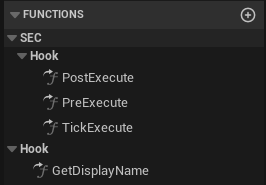
A hook has three phases:
| Phase | When it runs | Gives you |
|---|---|---|
| PreExecute | After BeginExecute succeeds, before cooldown commit, AddTags, and started delegates | A chance to abort: set bVetoExecution to tear down the start without stamping cooldown. |
| TickExecute | Each tick while the action executes | Per-frame work. Off by default; set bWantsTick to opt in. |
| PostExecute | When the action ends, on every exit path | The end reason (Completed, Interrupted, Cancelled, TimedOut, or Failed). |
Attach a hook in two places. Per action:
FActionSpec.Hook. For the whole enemy: UEnemyAIConfig.GlobalHook (under Recovery), which runs for every action it commits.When both are set they compose, global first then per-action, in each phase:
- Veto is OR. If either hook sets
bVetoExecutioninPreExecute, the action aborts. - Recovery accumulates.
RequestRecoveryTimecontributions from both hooks add up.
For stacked or conditional recovery time, call
RequestRecoveryTime on the context in PostExecute. Example: add extra recovery when the enemy ends the action below a health threshold.World State Tags
WorldTags carry global game state (boss phases, weather, arena state) into AI scoring. Push them through USECWorldTagSubsystem (or the one-node USECWorldTagLibrary helper). The build task copies them into FDecisionContext::WorldTags each tick, where they feed RequiresTags, BlockTags, and TagScoreMultipliers.The plugin ships three example world tags:
SEC.World.Combat.Active, SEC.World.Boss.Active, and SEC.World.Boss.Casting. Use them as starters or define your own.AdvancedWorld tag API: mutators and client reads
// Server BP, anywhere
USECWorldTagLibrary::AddWorldTag(this, SEC.World.Combat.Active);
USECWorldTagLibrary::AddWorldTagForDuration(this, SEC.World.Boss.Casting, 3.0f);
USECWorldTagLibrary::AddWorldTagUntil(this, SEC.World.Boss.Active, {YourGame.Boss.Defeated});| Variant | Behavior |
|---|---|
AddWorldTag | Permanent until RemoveWorldTag. |
AddWorldTagForDuration | Removes after N seconds. Re-adding refreshes the timer. |
AddWorldTagUntil | Removes when any sentinel tag is added. |
Mutators run on the server only (
BlueprintAuthorityOnly); client calls no-op silently.Client-side reads (UI, audio): drop
USECWorldTagComponent on GameState. The component replicates the subsystem's tags and broadcasts OnTagsChanged on clients. Without the component, USECWorldTagLibrary::GetWorldTags returns empty on clients and warns once.Contextual Execution
Sometimes an action needs a specific target, item, or magnitude. Creating a new ActionId per variation does not scale. Pass Context.
AdvancedExecuting with context and gating on the payload
1. Execute with Context
Call this from Blueprint or C++ to pass dynamic data:
FSECExecutionContext Context;
Context.Target = CustomTargetActor;
Context.OptionalObject = SomeItem;
Context.Magnitude = 0.5f;
Context.ContextTags.AddTag(Tag_QuickVariant);

ActionEvaluationComponent->ExecuteActionWithContext("SpecialAttack", Context);
2. Receive in Ability
Your ability (inheriting from
UGameplayAbilityBase) captures this data.- Event:
On Action Context Received(Blueprint) - Accessor:
GetActionContext()(Blueprint Pure)
Context mapping:
| Context Field | Maps To |
|---|---|
Target | ActionContext.Target |
OptionalObject | ActionContext.OptionalObject |
Magnitude | ActionContext.Magnitude |
ContextTags | ActionContext.ContextTags |
If
Target is not provided in context, the system falls back to the AI's current Focus Actor.3. Gate Before Activation
SEC hydrates the context before the ability activates. Override
CanActivateAbility (Blueprint or C++) on your UGameplayAbilityBase, read GetActionContext(), and return false to block.- Event-triggered activations (ByEvent, Execute With Context, reactions) fill the context from the payload.
- Tag and direct activations fill it from the AI's focus target.
// Inside your ability's CanActivateAbility override:
const FSECExecutionContext& Ctx = GetActionContext();
if (!Ctx.GetTarget() || Ctx.Magnitude < RequiredCharge)
{
    return false; // refuse before the ability runs
}
A refusal costs nothing: SEC commits no cooldown and interrupts no running action. Use it when your rule needs the payload. Use
CanExecuteAction for self or world gates that do not.Quick Setup
- Create Asset: Right-click → Miscellaneous → Data Asset → ActionSet.
- Define Actions: Each entry needs an
ActionId,SelectionWeight, an Execution Method, and (for range behavior) a Distance Scorer in its Scoring list. A new action with no Distance Scorer is distance-agnostic. TogglebEnabledoff to disable an action without deleting it. - Assign: Drop the ActionSet into your
EnemyAIConfig, or set it for testing:
ActionEvaluationComponent->ActiveActionSet = MyActionSet;See Configuration Reference for the full
EnemyAIConfig structure.Debug Tools
// On ActionEvaluationComponent:
ActionEvalComp->bDebugLogDecisions = true;  // Log scoring breakdown
ActionEvalComp->bDebugLogExecution = true;  // Log execution flow
The
SEC.Debug.LogActionDecisions 1 console variable does the same globally without touching the component.Integration Points
| System | How It Connects |
|---|---|
| Movement System | Provides distance/angle for scoring context |
| Combat Roles | Role changes trigger automatic ActionSet swaps |
| Threat Detection | Threat level feeds into FDecisionContext |
| Multiplayer | Action state replicates to clients via SECActionSetComponent |
Custom character classes:
ActionEvaluationComponent resolves the AbilitySystemComponent from the possessed pawn via IAbilitySystemInterface on possession. Pawns that do not implement this interface cause ability-based actions to silently fail. See Getting Started for setup details.Key API
AdvancedComponent and delegate reference
| Component | Location | Role |
|---|---|---|
ActionEvaluationComponent | Controller | Scoring, evaluation, execution |
SECActionSetComponent | Pawn | Resolution, replication, weapon/override management |
SECCombatControllerComponent | Controller | Orchestrates sync on role changes |
ActionEvaluationComponent (Controller)
EvaluateBestAction(Context, Time, OutChosen)- Run the scoring pipeline.ExecuteAction(ActionId)- Force-execute a specific action.ExecuteActionWithContext(Id, Context)- Execute with custom data (Target, etc.).SetGlobalMultiplier(Multiplier)- Runtime buff/nerf for every action (0blocks all selection).SetActionOverride(ActionId, Multiplier)- Per-action multiplier, folded with the global value.CanExecuteAction()/ModifyActionScore()- Override hooks (see above).
SECActionSetComponent (Pawn)
SetEquippedWeapon(Actor)- Weapon-driven action set override.SetRuntimeOverride(ActionSet)/ClearRuntimeOverride()- Boss phase override.GrantAction()/RevokeAction()- Runtime action management.OnActionExecutionStarted/OnActionExecutionCompleted- Replicated delegates for client UI/FX.OnActionSetChanged- Fires when the active ActionSet changes (replicated).OnActionCooldownStarted(ActionId, Duration)/OnActionCooldownExpired(ActionId)- Cooldown lifecycle delegates (replicated).GetRemainingCooldown(ActionId)/IsActionOnCooldown(ActionId)/GetAllActiveCooldowns()- Query current cooldown state.
AdvancedUpgrading from an older version
ActionSet assets migrate once on load; behavior is unchanged, and re-saving the asset persists the migration.
- Execution methods. Each action's old execution mode becomes an Execution Method: a Gameplay Ability action becomes a Gameplay Ability method carrying the same ability, tags, and timeout; a Behavior Tree action becomes a Behavior Tree Sequence method carrying the same trees and timeout.
- Scorers and gates (from v1.6). Each action's old distance and angle evaluations become a Distance Scorer and Angle Scorer, a non-default health or speed range becomes a Health or Speed Scorer, and a stamina cost above 0 becomes a Stamina Gate. New actions you author ship with no scorers, so they are distance-agnostic until you add a Distance Scorer.
- Display names.
GetDisplayName()replaces the oldScorerName/GateNametext fields, which are removed. Any label typed into them on a pre-existing asset is lost on load; re-label through aGetDisplayName()override.